Monday, June 17, 2019

Galway DMR Network


Work is almost complete on the equipment for the Galway DMR Repeater network. The Antennas should arrive shortly and the Software License upgrades will complete the outstanding work. The Licenses are in the process of approval from ComReg and once the paperwork is through we will be ready to place the equipment on site.

Hytera RD985D repeaters will be installed at each site with battery backup in the event of a power outage. The Repeaters will be connected into the Brandmeister Ireland Network.


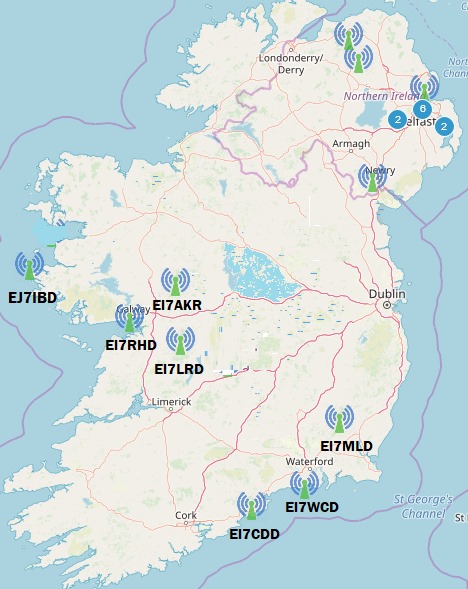
Brandmeister_EI Network map


Inishbofin Island - EJ7IBD
  
Frequency   430.475 IP439.475 OP            Power 40 Watts     Colour code 1

Antenna  CDF450-ARRAY –    Directional   4 Stack   7.5 dBd  Down Tilt Standard

Abbeyknockmoy - EI7AKR

Frequency   430.825 OP438.425 IP           Power 40 Watts     Colour Code 1

Antenna CDF450-ARRAY  - Omni-directional  4 Stack  6.5 dBd  Down Tilt Standard

Galway City - EI7RHD

Frequency   430.450 IP439.450 OP          Power 40 Watts      Colour Code  1

Antenna Omni-directional 4 x 5/8 colinear  9 dBd

Loughrea - EI7LRD

Frequency   430.500 IP:  439.500 OP         Power 40 Watts       Colour Code 1

Antenna CDF450-ARRAY  - Omni-directional  4 Stack  6.5 dBd  Down Tilt Standard

Roaming facilities on the Galway Digital Network will be possible.

Each Repeater will have TG 2722, TG2723 and TG 2724 set as Static Talk Groups on Time Slot  2.

Time Slot 1 is used for International Calling & TG9 Local

Time Slot 2 is used for Local EI, GI and UK talkgroups and for general chat & TG9 Local

On Time Slot 1 or Time Slot 2, TG 9 will enable calls to be made via the Repeater but not routed through the network. Two separate QSOs can take place simultaneously on the DMR Repeater. In fact, whilst Time Slot 1 is active for International contacts, local UK and Irish contacts can take place on Time Slot 2 at the same time.

The Multi-mode Digital Gateway is situated at the Galway City site operating on 144.850 MHz. This unit operates on Time Slot 2 only. It is currently running on DMR, D-Star and Fusion. P25 and NXDN could be set up at some future date.

Finally, we acknowledge the assistance from Rory McGuirk, Radio Security Products,  for  securing the Firmware Upgrade and Licenses for the Hytera Repeaters and taking the time to talk us through the upgrade process. Radio Security Products are main dealers for Hytera Equipment.

Free downloadable Data Card on the Galway Digital Radio Group Facebook Page in the files section.

Tuesday, June 11, 2019

Getting Started with DMR

Having read the comparison between the various modes of Digital Radio, DMR will undoubtedly stand out as the best value for money considering the price of basic Chinese manufactured equipment such as Anytone, Tytera, Retevis and Aluence. In Ireland, DMR seems to have become the more popular of the modes available at present. A Tytera dual band DMR Radio can be picked up for very reasonable money on Ebay. In the Galway Area a UHF single band Handheld will suffice with the coverage of the Local Repeater EI7RHD and proposed expansion of the network with three additional Repeaters.

The DMR radio is not operable straight out of the box and needs programming which does tend to be a stumbling block to some operators. This program is referred to as a Code Plug. In many cases. somebody will have written a comprehensive Code Plug for their area which may be of use. A Code Plug written for  the South Eastern area of Ireland will not suit the West of Ireland as the Repeaters or Gateways will be on different frequencies. If one is using a personal Hotspot it will be possible to program many channels for use on a simplex digital frequency from which the Hotspot will operate. As the infrastructure expands around Ireland it will be possible to program an All Ireland  code plug.

Initial programming does not have to be complex. Start by programming just the three Irish channels. If no difficulties are encountered it is possible to expand the Code Plug to encompass UK and follow on by adding International channels.

Terminology

A few basic terms need to be understood before proceeding to th programming of the Radio.

Time Slot

DMR uses Two-slot Time Division Multiple Access (TDMA) allowing two channels in 12.5 kHz of bandwidth using the AMBE+2 proprietary codec (or vocoder, voice encoder). “Spectrum efficiency of 6.25 kHz” is often used  although ‘it really uses 12.5 kHz, half the time.’ An illustration of the difference between an Analog signal and a DMR TDMA signal is shown below.


As there are two time slots it is possible to hold two conversations at the same time - One on Time Slot 1 and the other on Time Slot 2. Effectively this is the equivalent of having two repeaters on the one site but only using one TX/RX, one set of cavity filters and one antenna.

A user can only access one time slot at a time. Two Talk Groups cannot be accessed on the same Time Slot simultaneously. Each Time Slot occupies the signal for less than 30ms at a time. Within a 60ms window on a repeater: Time Slot 1 is transmitted for 27.5ms, then a gap of 2.5ms, Time Slot 2 is transmitted for 27.5ms, another 2.5ms gap, and then repeats with Time Slot 1. As there is slight latency in the demodulation of the DMR signal, the human ear will not  detect that small of a gap in audio. A repeater transmits both time slots even though one channel is in use and the other idle. This cuts down on the on/off keying of the repeater. User radios, on the other hand, transmit for 27.5ms each 60ms window. This results in extended life of the handheld battery. 

Talk Groups (TGs) - A way for groups of users to be separated on each time slot, without distracting or disrupting other users, is to use Talk Groups. The radio stays muted until the assigned Talk Group appears on the frequency, then it will unmute or activate for that transmission.
.
Ham radio Talk Groups can be created for any purpose and usually fall into the categories of Wide area (worldwide), Regional or for a particular purpose or group. In Ireland TG 2722 is a Calling Channel, TG 2723 is a Chat Channel and TG 2724 is a bridge between DMR and Yaesu Fusion. TG 2724 is connected into YSF Ireland allowing those on Yaesu Fusion to communicate with DMR users. The UK has a number of Talk Groups, UK Call, three Chat TGs and a number of Regional TGs.

TG 91 is a worldwide Talk Group monitored all over the world. Europe has a specific English speaking TG amongst others, the United States has a Nationwide call TG and also many regional TGs for each call sign area. 

In Ireland we tend to allocate Time Slot 1 to International Talk Groups and Time Slot 2 to our Domestic TGs and UK. Bear in mind, that calling on International TGs may come out on many Repeaters at once so do request that a longer QSO is conducted on Time Slot 2 on a "chat" TG.

TG 9 is a talk group assigned for non specific use. If calling another station point to point, the use of TG 9 will be a common meeting point. If used via a repeater, the Repeater will behave like a normal voice repeater and just relay the up-link. Any other Talk Group will be routed through the network to its destination. An example, TG 2722 would route through the whole network for a general call. 

Static TGs - A static Talk Group is a talk group programmed onto the Repeater on a specific time slot. If a call should be made on this TG, then it will be automatically relayed through the repeater. Sveral Static Talk Groups may be programmed onto a repeater. International TGs would be programmed to TG 1 and Domestic and UK TGs on Slot 2.

Dynamic or User Access (UA) TGs - Dynamic TGs are those selected by the user. These are pre-programmed into the Radio. On pressing the PTT they will automatically routed through the network. If one selects another Dynamic TG, the Repeater will disconnect from the one previously used and connect to the newly selected TG. If a Dynamic TG has not seen any use for 15 minutes, it will automatically disconnect from the network.

Reflectors - are similar to D-Star or IRLP reflectors,  where nodes are connected in a round table type configuration. When one station transmits, their signal is transmitted by all other connected nodes. So far, these sound like Talk Groups. The difference is reflectors are available worldwide and repeater users have to specifically link and unlink a reflector. This means only repeaters and hotspots connected to that reflector are tied up during transmissions and not thousands of repeaters on world-wide Talk Groups. 

A Reflector has a 4-digit ID that begins with a 4, as in 4xxx. Reflectors are only available on Time Slot 2 via the Brandmeister system. To disconnect from a Reflector on keys in 4000. Reflectors may be programmed into a memory bank. Brandmeister have this ability. Some reflectors are cross-patched to Talk Groups on Brandmeister so either the reflector or Talk Group ID can be used. Reflectors are seldom used on Brandmeister because of the availability of all Talk Groups to all repeaters and hotspots on the network. However, reflectors still serve the intended purpose if a station isn’t in range of a Brandmeister repeater.

Contacts - There are three call types in DMR: Group Call, Private Call, and All-Call. Each is a contact within the radio. A Group Call is a transmission from one radio to a group of radios. These instantly link-up dynamic Talk Groups when PTT is pressed.

An example of a Group Call would be TG 2722 (Ireland Calling Channel) When the PTT is pressed, any radio linked into and listening on TG 2722 will unmute and the call will be heard.

A Private Call may be initiated from one radio to another using the Radio user's ID point to point or via the network. If the radio called has used the network the call will be routed to the last known Gateway or Repeater - a little like D-Star! Private Calls are discouraged on the network as they can tie up a Time Slot or even break into an existing QSO on the destination Repeater. A Private call may only be returned if the originator's ID is programmed into the destination radio.

All Call is a facility used by a supervisor on commercial systems and will result in the call being heard by ALL users on the given time slot. This is NOT used under any circumstances on an Amateur Network for obvious reasons.

Getting Started

It is necessary to register for a DM ID number which is your personal ID and this will link to your call sign and name. Registration for a DMR ID may be obtained  >> Here.

Follow the instructions and have a PDF copy of the front page of the license to upload completing the registration process. The ID is issued within 24 hours. Follow the steps below and programming will become second nature. Rome wasn't built in a day, and neither will your code plug!

The order in which programming is done is as follows:

1) Contacts
2) Channels
3) Zones
4) Placement of Channels in Zones

The programming software for an individual radio is down-loadable from the manufacturer's website, or on a disc supplied with the radio. In this brief tutorial, it is the Tytera MD-380 or clones such as Retevis or Zastone handhelds programming described.

On running the program this is the first screen that will appear


If the set is a UHF handheld, this is the basic information see. Attach the programming lead supplied with the radio to the computer and then switch the radio on. Look along the toolbar of the program ans to the right of the disc symbol there is a picture of a handheld radio with an white arrow pointing to the left. Click on this and anything programmed into the radio will be downloaded to the program on screen. Normally, there is one channel as an example already in place. The view shown is the Basic Information which is the first item in the menu.

General Settings

Click on General Settings and the following screen will appear


Look at the positions highlighted by the red arrows. The Radio Name is your Call sign and this is typed in Capital Letters. The Radio ID  menus the DMR registration number assigned to your call sign. The two boxes shown at the bottom right of the screen can contain in Line 1 - your name and Line 2 - your call sign. These may be left blank as they will not affect the operation of the radio. Best to leave all of the other settings alone until a greater understanding of the radio is realized.

Contacts

On the menu, click on Digital Contacts and this screen will pop up


Click "add" at the bottom of the screen. Enter the name of the contact in the "Contact Name" box - it is possible to replace the words "Contact 1" with the name required/ Click on Call type and three options will be available on the drop down menu. Most Talk Groups will be Group calls, whilst individual call signs will be Private Calls. Enter a contact here which may be a Talk Group, Reflector or an Individual.

Any number of contacts can be added to this box for future use

To program a channel the layout would be as follows:

No    Contact Name        Call Type       Call ID

1          Ireland Call           Group            2722

2          Ireland Chat         Group            2723

3          YSF Ireland          Group            2724

4             EI4ALE               Private          12345

A complete list of individual Talk Groups may be found >> Here

Ireland Call is the Irish calling channel. It is a Talk Group and will be a Group Call so all can hear that call when it is made. 2722 is the DMR ID of that Talk Group. EI4ALE is a Private Call so when the call is made it will be only directed to that individual. On completion of the contacts screen, the next task is to assign channels.

Channels

From the menu, select "Channels" and the following screen will appear


All of the positions with red arrows need to be filled in the following order

Channel Name - From our Example above, this one can be named Ireland Calling Channel
Channel Mode - Generally defaults the Digital, if not the drop down menu will allow selection
Frequency - Your Choice of Frequency for the RX and TX frequencies. The same if simplex.
Contact Name - Click on the down arrow and all of the contacts will be displayed. Choose The Ireland Call Channel
Colour Code - Can be any number 1 -15. generally set to 1 unless otherwise required
Repeater Slot - Can be set to 1 or 2. On repeaters, International contacts on Slot 1 local on Slot 2
TOT (S) -  Set to 180 secs as all networks time out after 3 mins
Power -  Set to low power if using a local Hotspot or High for a Repeater

If it is planned to use the Radio with a Hotspot such as an OpenSpot or DVMega, program the simplex frequency of the device you wish to use.

It is possible to program Analog Channels for Repeaters or Simplex use. CTCSS tones can be included on Analog Channels.

Zones

With earlier set there were a maximum of 16 zones where 16 channels could be stored in each. This equates to about 256 channels. This allows one to sort specific areas into a common Zone. A Zone could be Ireland and UK contacts where all Irish and UK channels could be stored, Another could store USA channels and so on.

Zones may be selected from the menu. Click on Zone 1 in The menu and the screen shown will appear. This Zone can be renamed relevant to the channels therein. Click on Zones several times and more will be added.


Click on Zone 1 in the menu and the screen shown will appear. This Zone can be renamed by back spacing over Zone 1and giving a relevant name for the channels contained therein.

To add channels to the Zone, the available channels will be shown in the Left hand column. Click on a channel in the list as in channel 2 in the diagram which is highlighted. Click the add button in the centre of the box and the channel will be transferred into the Zone on the right hand side as a channel member.

In the case of the Tytera MD-380 there are only 16 Zones available for programming with channel members.

Now SAVE THE PROGRAM to the computer before transferring the code plug into the Radio. It is generally best to program a few channels and try them out before adding more. Program local channels first and then move on to outside the country.

Most DMR Radios follow this protocol. It may seem laborious in the beginning but it becomes second nature after a few tries. It is really no different to using Chirp to program Analog Radios.

Operation of DMR

Once fully programmed, switch on the radio, select the Zone with the desired contact contained therein. Press the PTT and put out a call. It is normally wise to call on a calling channel such as Ireland Call or UK Call. From there one can move to a chat channel. A more complex Code Plug will have channels allocated for use on Hotspots, Gateways and Repeaters depending on the equipment in the locality.

Bear in mind that International contacts should be made on Slot 1 and Local and UK contacts on Slot 2. This will ensure free QRM free operation. Remember that calls made to Talk Group 9 may be used on either Slot as these will only be relayed locally and not routed through the Brandmeister Network.

Galway Facilities

The Galway City DMR Repeater EI7RHD operates on Input 430.450 and Output 439.450. Both Time Slots may be used. TG9 is relayed through the system in the same manner as an Analog Repeater. All Other Talk Groups will be routed through the Brandmeister Network. Talk Groups 2722 Ireland Call, 2723 Ireland Chat and 2724 YSF Ireland are programmed in as Static Talk Groups which means that any activity on any of these Talk Groups will be re-transmitted by the Repeater.

The Galway City simplex Multi-Mode Gateway EI2GCD operates on 144.850. This Gateway only operates on Slot 2. The Gateway is located on the same site as the Repeater. The operation of Busy International Talk Groups on this device is not encouraged as they tend to take over the system preventing other users benefiting from the system. It is ideal for use with Local and Semi-Local Talk Groups. Always Disconnect from busy International Talk Groups after use.

Proposed Expansion

The Galway DMR Network is due to expand with a Repeaters located on Inishbofin Island, Abbeyknockmoy and the Eastern side of Loughrea. This should provide 95% coverage of County Galway with spillover coverage into neighbouring Counties.

---ooo00O00ooo---

Monday, May 13, 2019

Phase III & Phase IV of the Galway DMR Network Proposal Updated

Recent discussions have taken place regarding the placement of Repeaters to complete the Galway Digital Network. Each of these Repeaters will be running DMR only.

Proposals put to the three Radio Amateurs, involved in the Wireless Internet business, have been productive and greeted with enthusiasm and acclamation. Kind offers of feeder and antenna systems have also been made which will speed up the process.

We await the final Software and firmware upgrades for the Hytera RD 985 Repeaters and also the licensing process to issue. We should have all in place as soon as possible. Minimal bench testing is required to get this system running as the initial programming has already been completed.

Assuming all four Repeaters are installed and running, as anticipated, the following maps reveal the probable coverage for the entirety of Co. Galway and neighbouring Counties such as Mayo, Roscommon, Clare and even touching into areas further afield.

See the coverage maps below:


The locations L - R  -- Inishbofin Island, Galway City, Abbeyknockmoy and Loughrea all situated in Co. Galway.

The illuminated satellite map below shows the coverage with a little more clarity


By implementing Roaming facilities, there would be almost seamless coverage of the County and surrounding areas. All that is required is adjacent areas to place something on the air to cover the South, East and North.

Overlapping coverage from other Repeaters adjacent to the Galway coverage areas would complete the picture. An example would be the Repeater located on Mount Leinster which would give coverage of the South East and one could roam from Galway coverage into the Southern coverage through this system.

Factoring Mount Leinster's Digital Repeater into the Galway coverages, the net result is shown below


There are supposed to be Repeaters covering Cavan, Dublin and Drogheda that would also complete the picture. Sadly neither Cork, Kerry or Limerick have any interest in setting up a system at present.

Interesting times ahead! Watch this space for updates.

Monday, May 6, 2019

Interested in D-Star?


D-STAR (Digital Smart Technologies for Amateur Radio) is a digital voice and data protocol specification for amateur radio was developed by the JARL and was the first digital radio system designed specifically for Amateur Radio. The D-Star system was in the development stages in the late 1990s before its release in 2004. At the Dayton Hamvention (2004) there were demonstrations of D-Star and the AOR 9000 Digital voice system used on HF.

The advantage of D-Star, like all of the other Digital modes is that it utilizes less bandwidth and the quality of the audio is better than an analog signal at the same signal strength provided that the signal is above the minimum threshold. D-Star has the advantage of a number of years development over the newer Yaesu Fusion System.  
   
D-Star is capable of linking repeaters together locally and through the Internet utilizing call signs for routing of traffic. Servers are linked via TCP/IP utilizing proprietary "gateway" software, available from Icom. This allows amateur radio operators to talk to any other amateurs participating in a particular gateway "trust" environment.    

D-STAR transfers both voice and data via digital encoding over the 2 m (VHF), 70 cm (UHF), and 23 cm (1.2 G)Hz) amateur radio bands. There is also an interlinking radio system for creating links between systems in a local area on 10 GHz, which is valuable to allow emergency communications oriented networks to continue to link in the event of Internet access failure or overload.  

What is available - a picture is worth a thousand words


D-Star transfers voice and data by digital encoding over the 2m, 70cm, and 1.2 GHz amateur bands. There is an interlinking radio system for creating links between systems in a local area on 10 GHz which would allow emergency communications oriented systems to continue to link in the event of Internet access failure or overload. See below
.
Features

1) Digital Voice Mode through Repeaters and Gateways Internet Access
2) Short Data Message whilst in Digital Voice mode
3) GPS tracking mode whilst in Digital Voice Mode
4) Digital Data Mode via the Internet
5) I.P. camera in Digital Data Mode - watch digital images sent in real-time
6) Point to point direct Digital Voice mode
7) Analog operation direct or via Analog Repeaters or Gateway

Most D-Star operation results from users talking over links to other users connected to reflectors. Reflectors are conference servers. Many Repeaters may be connected to a particular conference server. A transmission on any one of the connected systems is repeated on all of them. There are actually more operators to talk to than just those connected to within the RF distance of ones own local repeater.

Getting Started 
   
It is necessary to register for the D-Star Network. This is simple enough as it is possible to register via Icom UK. Send the following: Name, Call sign, Postcode or location, and email address, to info@icomuk.co.uk. This is probably the easiest way. It is also possible to do it yourself via by Googling D-Star registration. This can have its own problems! Once Registration is complete, it is possible to use the facilities D-Star has to offer.   

Setting up the Radio

As with most radios, it is necessary to set up the date, time, and add your call sign. The GPS may be left on to send out position information but, if it is not required, turn it off so save the battery. Select the desired mode - either analog or DV.
.
Facilities

 Simplex Operation


Local Repeater Call


Gateway Repeater Call


 Calling Via a Reflector


Linking to Reflectors

There are a couple of  systems available:

D-PLUS has probably caused the most significant D-Star growth around the world. D-PLUS reflectors are designated REF###x as in REF001C etc.

Two other linking systems have since been written:

DExtra creates XRF reflectors and DCS creates DCS reflectors. They all operate in a similar way.

Linking is relatively easy. Most D-Star Repeaters allow registered users to issue Link and Unlink commands over RF. These commands need to be inserted into the URCall of the radio and then press the PTT. An Example of a Link command to REF001C as follows -- "Place REF001CL" in URCall. Note the first 6 positions are for the name of the reflector as in REF001, the 7th  position is the Band Module, normally A, B, C, D, E,   and the 8th position is the D-Plus command. L is the link command and U is the unlink command. Is is common practice to program the a couple of memories with these commands.

Practical Use of D-Star
.
Most D-Star Repeaters are connected to Reflectors. Any Radio Operator registered with D-Star can connect with another Radio Operator beyond the coverage of the local Repeater. Connection to any part of the world is possible with a relatively simple combination of button presses.

D-Star can be used with Digital Access points such as the DVAP, Openspot and DVmega etc.

One of the outstanding features of D-Star is the ability to call another operator without knowing their current location or on which Repeater or Gateway they are located. If an operator has used a Repeater of Gateway in the UK, it is possible to connect to their call sign via one's own Repeater/Gateway and D-Star will automatically route to the last known destination. If should move to another area and use D-Star it will automatically route to the new location.

Facilities Available in Galway

D-Star has been implemented on the Galway Multi-Mode Digital Gateway on 144.850 MHz. Aengus, EI4ABB, has a D-Star Gateway which may be pressed into service on the 70cm band at some future point in time. 

In Conclusion

D-Star has been around since 2004 and many modifications to the system have been made to the operation. D-Star is a System designed specifically for Amateur Radio use and is quite complex as a result. APRS and Digital messaging is possible whilst in QSO and are transmitted simultaneously.

It is not easy to use equipment straight out of the box and reading the manual is essential to derive the best possible use. The basic ID-51E Plus2 manual is 90 pages long and explains the use of the system very well. The advanced D-Star Manual for the ID-51E Plus2 Handheld is literally 400+ pages long and is useful for reference purposes. It would take some time and patience, which we as amateurs don't have, to wade through this manual. We are, however adaptable!

The Nifty E-Z guide to D-Star Operation by Bernie Lafreniere, N6FN, gives an easier tour of the facilities with comprehensive explanations. The Nifty Mini-Manual is also a superb source of reference. In addition, D-Star is well documented on the Internet so there are plenty of resources should difficulties be encountered.

There are over 50,000 D-Star operators so there is no shortage of people to chat with. A number of Worldwide D-Star nets are held and they are well populated. As a starting point, try REF 001C where there is an abundance of activity. Reflector  DCS 049 I will yield activity from all over Ireland both North and South and REF005C for the London area.

D-Star operation is possible on most amateur bands from 80 metres to 10 GHz

Voice quality is excellent and especially somewhat enhanced since the AMBE+2 chip has been implemented.

Verdict - A steep learning curve but once mastered it becomes second nature.

Sunday, April 28, 2019

Which Digital Radio System? A Comparison of What is on Offer

A frequent question often asked at meetings and lectures is - "Which is the standard Digital Mode for Amateur Radio use". The answer is simple, they are all standards in their own right as are CW, AM, FM and SSB. Would anyone ask what is the standard Analog Mode? You could have a comprehensive and very active DMR network fine-tuned and perfect for operation in your locality and somebody will buy D-Star instead, so it is really down to personal preference.

In Galway, both DMR and Yaesu fusion have proliferated equally with just three operators showing an interest in D-Star. At the same time, interesting and successful experiments have been carried out using the P25 and NXDN Digital Modes through the 2m Digital Gateway.

What is Digital Voice?
.
Digital voice transmission is achieved by passing the analog voice signal through an Analog to Digital Converter where the digital signal is then passed through a Voice Encoder (Vocoder) which analyses and synthesizes the voice signals and compresses them and adds forward error correction to ensure accurate reproduction at the receiving end. The data is sent in packets with a header prepended to provide sync bits, routing instructions and user identity. Other data may be interleaved or substituted for voice to send text or pictures. To decode the signal off air the reverse of this process is employed where the demodulated signal from the receiver is passed through a digital to analog converter and to the speaker. The diagram below is a simple representation of the process.


 What makes digital voice more efficient?

As seasoned VHF operators know, the audio quality of an Analog VHF FM signal will deteriorate as the signal strength reduces. The resultant sound is a hiss accompanying the voice signal as the signal to noise ratio decreases. Digital voice is encoded with error correction and once decoded at the receive side, will remain noise-free as noise is not part of the encoding process. Consulting the diagram below, it may be clearly seen that the audio quality of a digital signal can be maintained beyond the point at which the signal to noise ratio has decreased on the Analog Signal. Once the signal strength has become too low to decode due to packet losses, and subsequent increase of Bit Error Rate, the digital voice signal will deteriorate into R2D2 sounds where the signal finally becomes incoherent.


Barrett Communications have incorporated a Digital Voice system into their HF SSB Military/Bush radio system. At the point which the SSB voice signal is barely discernable, it is possible to initiate the digital mode and the voice becomes immediately readable with good strong audio and no noise in the background. The link to the YouTube video may be found Click >>Here.

Comparison of technical specifications

                                                 D-STAR                            DMR                           Fusion

Vocoder                                     AMBE+2                        AMBE +2                    AMBE+2

Forward Error corr                 Voice only                   Voice only                  Voice only

Modulation method                GMSK                              4FSK                         C4FM

Multiplex Method                  FDMA                             TDMA                        FDMA

Transmission Rate                4.8 kbps                          4.8kbps x 2                9.6 kbps

Bandwidth                               6.25 KHz                       6.25 KHz                    12.5 KHz

Developer                                JARL                              ETSI                           Yaesu


Signal Readability

                                                 D-Star                DMR                     Fusion

Voice quality                            Good                 Good            Narrow mode - Good
                                                                                                  Wide mode     - Very Good

Signal Noise                            None                 None                      None    

Sync Robustness                     Fair                   Good                      Good

Sync Recoverability               Poor                   Best                       Best


Ease of Operation

D-Star

Memory selection  - Dial or GPS search.
Repeater Connection selection  - Dial
Mode selection method - Key Press
Radio Programming - Difficult/ Easy - Most recent Radios may be easier.
Learning curve - Steep
Cost - Expensive

DMR 

Memory selection  - Key Press
Repeater Connection selection  - Dial
Mode selection method - Fixed in memory
Radio Programming - Difficult
Learning curve - Easy
Cost - Reasonable

Yaesu Fusion

Memory selection  - Dial
Repeater Connection selection - Keypress  
Mode selection method - Key Press
Radio Programming - Easy
Learning curve - Fairly Easy
Cost - Expensive

The problem with D-Star and Yaesu Fusion is that they are proprietary and therefore cannot be reproduced by another manufacturer at a cheaper price. They can only be manufactured under license as in the case of D-Star which has been manufactured under license from Icom. Kenwood, by no means, produces D-Star radios any cheaper.

Services available in Galway

Currently, we have a 70cms DMR Repeater and a 2m Multi-Mode Digital Gateway located on a high spot on the West Side of the City. Both have good coverage of approximately 30 miles radius. The DMR Network will expand to incorporate a 70cm DMR repeater at Abbeyknockmoy and there will be two more Repeaters coming on stream within the year. In short Co. Galway will be well covered using DMR and the coverage will also spill into neighbouring counties.

With four DMR Repeaters, it will be possible to set up roaming facilities. Roaming is similar to the way in which cellular phones work. The mobile station will scan the four Repeater frequencies and as the station moves to the footprint of a stronger Repeater, it will switch over to the frequency of the stronger signal. The shift from one Repeater will be barely noticeable to the operator. With the coverage of Co. Galway and into neighbouring counties, this system will be possible. Not all handheld or mobile radios will have this facility.

The Multi-Mode Gateway operating on 2 metres will provide the opportunity to utilize DMR, Fusion and D-Star. P25 or NXDN is possible through this system but are not active on a standard basis. Experimentation is encouraged so consult the Sysop - Steve, EI5DD, if you wish to try the P25 or NXDN system.

The EI2TBR Analog/fusion Repeater will be placed on a high site sometime in 2019 and will increase the range of Yeasu Fusion. This Repeater is also connected to the Wires-X network. It should be noted that there is a simplex Wires-X Gateway located in Salthill, Galway allowing experimentation with networking on the Yaesu Fusion mode.

The choice of Digital radio communication system is down to the facilities available in the locality.

Personal Hotspots, such as the DVMega, Shark Openspot, and MMDVM Hotspots allow use on all modes in areas not served by a Repeater or Gateway. Access to Reflectors or Talk Groups on a local or worldwide basis is possible via a Hotspot. It is necessary to have an internet or WiFi connection to use a Hotspot. 

In conclusion 

It would be prudent to evaluate the facilities in the area before deciding on which mode or system to operate. DMR would be the popular choice in Galway with 4 Repeaters due online and also via the Mult-Mode Digital Gateway EI2GCD. Fusion is catered for by one Repeater, EI2TBR, and a Multi-Mode Gateway, EI2GCD and a Fusion Gateway EI2SHD. D-Star is currently only available via the Multi-Mode Digital Gateway, EI2GCD.


DMR is a cheap and efficient entry into Digital Voice Communications. The Tytera and Anytone Handhelds are reasonably priced and boast good quality audio. Tytera produces a dual-band MD9600 also of superb quality. One can buy Motorola gear at a higher price and have a "Rolls Royce" of a radio if deemed necessary. The flexibility of DMR is down to the way in which, you the user, programs the radio. It can be simple or complex you decide. The programming of the DMR Radio does tend to deter many but once mastered it is quite relaxing to build a code plug program and satisfying when it comes together. Bear in mind that this is a commercial standard, and NOT Amateur so take it as it is - NO silly amateur quirks. It is still an excellent mode. Audio quality is generally excellent. Only the pedantic would find fault in this mode.

Yaesu Fusion is a C4FM system produced for the Radio Amateur and has all the little unnecessary frills demanded by the hobby. It is relatively expensive but cheaper than D-Star. It is easy to get started as it is only necessary to add your call sign to start the radio. From there it is easy enough to operate without consulting the handbook but it is generally better to do so if you wish to know all the little secrets Fusion has to offer. The Wires-X system is a nice addition and it is possible to link to locations all over the world. In some cases, there are many nodes connected to the one-room so the chances of a QSO is reasonably likely. The facilities are not as well developed as D-Star but given time there are interesting developments on the cards. The audio quality of the Fusion mode is generally excellent.

D-Star is expensive. The AMBE Chip was developed specifically for D-Star and therefore nobody else can utilize it without license. The D-Star GMSK system was developed specifically for the Radio Amateur and consequently has a manual the size of a telephone directory and it is advisable to read this before set-up. The initial set up is cumbersome but once mastered it is plain sailing. The technology is old but has been developed to what it is today and almost all quirks have been programmed out of the firmware. The infrastructure is well populated and facilitates linking between Repeaters and Gateways. Icom continues to produce improved models of their radios and the quality is excellent. Audio Quality is generally excellent and much improved since the system was upgraded to the AMBE+2 Chip.

Check out the pages of the Radio dealers for the best quote on any of the above systems. EBay will often produce some good second-hand gear but the cheap prices may introduce their own problems. Tytera MD 380 Handhelds are often available for less than 100 Euro. The UHF handheld will suit the Repeater whilst the VHF version will suit the Gateway. For a few shillings more the Anytone 868 or 878 Dual-Band Handhelds are good value and boast good audio.

Monday, April 15, 2019

Using APRS During the Connemara Ultra Marathon 2019


Time flies, and it does not seem like a year since the last Connemara Ultra Marathon. Our communications systems are well tried, tested and documented, which means we have a wide choice of reliable facilities at our disposal. Our primary operation, for those in the field and following the Ultra and Full Marathons, was on 3750 KHz using USB which results in a relatively clear channel with little QRM from UK stations. VHF and TM-7 radios were used along the stretch of road from Leenane towards Maam Valley and Maam Cross. This was a busy stretch and catered for Marathon Walkers, Half Marathon Runners and then the Runners from the Ultra and Full Marathons.

A Tetra radio was supplied by the Order of Malta to enable direct access to the Ambulance system should a major problem develop. Fortunately, this was not needed on this occasion.

VHF was used to communicate from the Base Location to the medical Centre at Maam Cross. The Order of Malta Ambulances were controlled from Maam Cross.

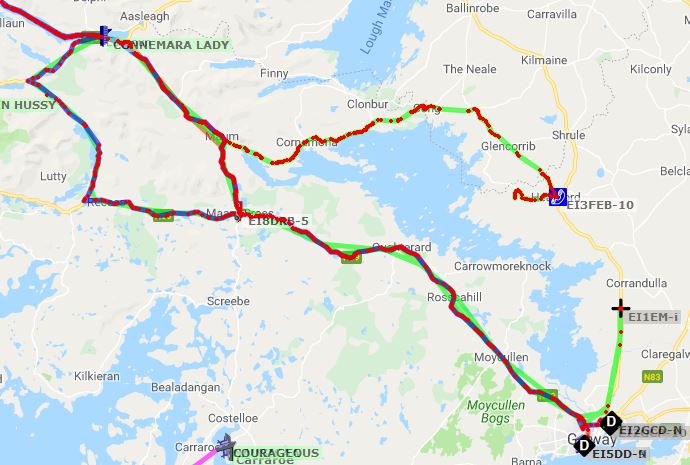
The course for the event is as depicted below and shows the starting points for each of the Marathons.


This is by no means new technology, but a  new addition to our operation this year. The reason for employing the Automatic Packet Reporting System (APRS) was to save a lot of irrelevant chit chat on the air. Quite often an operator is asked where he is and, unless he knows the area well, his answer would not exactly pinpoint his position unless he gave GPS coordinates. Indeed there is a slight lag before a position appears on the map but this is not "Air Traffic Control" so the lag is unimportant. This was a great improvement from a Net Controller's point of view.

APRS is, as we all know, and indeed take for granted, a system which will allow the positions to be sent to the APRS server and plotted on Google maps via the Click >> APRS.fi resource. Unfortunately unless one has a major conglomeration of APRS digipeaters, the only way to make any use of the APRS system is to use the mobile phone App "APRS Droid" which is downloadable via Google Play.

Two systems were in use during the event; mobile phone data was one and the other was the Android operating system of the TM7 Internet radio. Both systems worked equally well as they used the data system of the cellular network. It was suggested that the APRS facility was switched on as soon as one became mobile and en-route to the activity in Maam Cross to save anyone having to worry about the time operators were going to arrive. Any inquiries from organizers or marshals in the field regarding the location of different sections of the marathon could be dealt with immediately or even displayed on a tablet or mobile phone

Here is an example of the screen showing the activity throughout the day.


This satellite view looked better but not as practical from a net controller's point of view. It is obvious why VHF communications are not the system of choice. Ground wave on 80 metres is the ultimate system for use in this terrain.


There are a combination of tracks from all of the operators who took part. As the activity was in progress it was possible to see the individual call signs progressing along the route. Whilst at the individual road junctions, it was possible to show the Gardai where the runners were located and how long it would be before the traffic would need to be halted to let them past.

Two systems were in use during the event so mobile phone data was one and the other was the android operating system of the TM7 Internet radio. Both systems worked equally well as they used the data system of the cellular network. It was suggested that the APRS facility was switched on as soon as one became mobile and en-route to the activity in Maam Cross to save anyone having to worry about the time operators were going to arrive and where they were at the time.

The level of competitor fitness certainly was impressive, with the majority of entrants completing the course earlier than previous years. However, there were a few stragglers and these were monitored right to the homeward stretch in the Maam Valley. The numbers were relayed to the finish line before the net was closed. All credit must go to the organizers of the Connemara Ultra Marathon as they have absolutely every angle covered to ensure safety and smooth operation of the event to give the entrants the best of facilities for their efforts.

The map below shows the APRS tracks of operators from leaving home and returning


The trip home provided an opportunity for more relaxed conversation on C4FM and comparison with the TM-7 system.


The Net Control Station with  FTM 100 for VHF, Codan 9780 on HF, Inrico TM-7 on PTT over Cellular and APRS display on the Laptop.

The antenna systems were a vertical co-linear for the VHF Band and an Inverted-Vee for  HF. Easy to deploy and work very well in this area.


In Conclusion, HF is invaluable for full coverage of the Connemara area. VHF gives, at best, a  7.5 Km range with the occasional surprise in places. VHF is fine for dealing with small local problems and not interfering with the main running of the event, The TM-7 is good for the entirety of the region due to a large number of cellular systems in the area. It does not impinge on the main network and can be used to deal with localized problems as well as cover vast distances and into RF black holes.

DMR would have been used on this occasion but, of late, the Irish Brandmeister system had been taken off air for maintenance and updates on a number of occasions at weekends, which meant that this may not have been reliable enough to warrant its use. Perhaps, if a few more weeks had passed, we would have had more confidence in the system although switching our system to another Brandmeister Server may have been a better option.

Thursday, April 4, 2019

Teamspeak 3, Zello and Internet Radio

Internet Radio

Setting up cellular data to access live Amateur RF gateways or repeaters across the world can be easily done. A PTT enabled phone will make it even more like radio operation. It should be borne in mind that this is not Amateur Radio "as we know it" but is an alternative that allows those who don't have the space to set up antennas, or live in heavily restricted areas, to access amateur radio Repeaters or Gateway systems via the internet. It is communication at the end of the day. This is a little like operating a "Flex Radio System" from an Android tablet or mobile phone.

Internet Radios can be operated from the WiFi system in the house or via data from the Cellular Network provided a SIM card is installed.

Setting up The International Radio Network (IRN)

Download “Team Speak 3”. It’s available for Android, iOS, Windows and Mac.

Add the IRN Server. Details are as follows:

Label:           IRN CrossLink Server 
Address:       irn.ts.io (all lower case)
Password:    leave it empty
Nickname:    CALL SIGN – Your Name e.g. EI#XYZ –Fred

After connection to the IRN Server, you will be directed to the Welcome Channel. It will not be possible to operate any other channel until you become registered. 

KB1UPZ - Bob is the administrator so call him and introduce yourself with Name and Call sign. Provided that you are listed on QRZ.com as a licensed operator Bob will register you immediately. 

There are a wealth of channels available and these may be accessed by hovering over the channel on screen and touching the screen to enter. Some may be locked and require a password but the majority are not.


The Internet Radio above has an Android Operating System. It is possible to add Echolink and Peanut options to this radio and also Zello. Of course it is possible to use Teamspeak 3 on the Android tablet and Windows systems thereby giving a wide access to many communications systems. The set up is exactly the same.

Below is a screenshot from Windows showing the variety of Talk Groups available. The Galway VHF Group has a permanent Talk Group on this system. It is generally accessible but occasionally Password Protected if there is a specific discussion or operation taking place.


Zello

Zello is another system which is not as secure as Teamspeak and anyone can set up a channel for private use. In fact, with the reduction of Solar conditions, many CB groups have set up Zello Channels where they can hook up and hold QSOs. Internet Radio is widely used by Truckers for exactly this reason. 


Setting Up Zello is simple

1) Go to https://zello.com/ and create a Zello account making sure to remember the password and it is best to use the call sign as the user name

2) The best version of Zello for Internet Radio is Zello V3.53 which is easily found by an Internet search

3) Log into Zello once it is loaded with User name and Password. It is possible to add contacts or Channels – the latter being specific Groups etc and Contacts are individuals

The Southern Ireland Repeater Group have  a channel on Zello and it is necessary to contact them to gain access to the channel. There will be no problem provided that you give them your call sign. This will give access to a large network of linked repeaters. Of late, the Zello access has become very popular and a fair amount of activity on the system is from android based equipment.


The Zello system can be operated from any android based system such as tablet or phone and internet radio. Zello is also available for use on Windows Operating Systems.

EchoLink

Echo link for Android may be downloaded to any Android system such as Tablet, Phone or Internet Radio. It is necessary to register with EchoLink to allow the program to work. This is a simple process of giving your details and uploading the front page of the Amateur License. 

Run the Echolink program on the Android device and fill in your Call sign and Password. and EchoLink will run giving all the options available. EchoLink also runs on Windows-based operating systems. 

Peanut

This system provides access to the D-Star Network and has been described as a previous posting on the VHF Group Blog.  

Current Galway VHF Group TM-7 Users

Steve EI5DD    Joe EI3IX    Tom EI2GP    Andrew EI3FEB    John MI0AAZ    

In Conclusion

Whilst Internet Radio is often branded as "Not Real Radio" by the "old and bald" and in fact, the "neo bald", it provides a means of communication to those with limited resources for antenna installation and who are dogged by QRM complaints. Irrespective of where in the world one wishes to operate, provided there is a cellular network there is access. Operating mobile does not require any external antennas making life simple. If one is away on the holidays it is possible to keep in touch with the hobby through the Internet radio system. If you have no license at all use Zello to set up a personal channel to keep in touch with family and friends. 

Whilst the only communications modes have been mentioned here, there are other Amateur Radio programmes available for Amateur Radio use such as APRS Droid, and it is further possible to add an RTL dongle and set up an SDR receiver system.

Tuesday, April 2, 2019

Peanut for Android and Windows Operating Systems


Those involved with Digital Communications often gravitate to one or more digital modes. DMR is relatively easy to get into with a large number of reasonably priced handhelds available. For some reason, the programming of the radio seems to be a stumbling block to operators who don't read the manual before trying to use it. Yaesu Fusion is another alternative and is possible to go straight on the air with very little effort  - The callsign must be entered before the radio can boot up. D-Star has always been expensive and the set up is a little more complex.

Enter Peanut, a new program produced by David, PA7LIM. Peanut is a project allowing a first impression of the world of Digital Ham radio. Peanut allows access to some D-Star Reflectors and specific rooms via an Android device  4.X or higher or a Windows System using O.S. 7 or higher. If the experience is good on Peanut then it may trigger an interest in the purchase of an ICOM D-Star radio. If there is no Repeater or Gateway nearby, then it is possible to access D-Star via a personal Hotspot such as a DVMega, MMDVM, or SharkRF Openspot.


On the Peanut, it is possible to talk with HAM amateurs around the world via an Android device or network radio. Some of the ROOMS are connected to DSTAR reflectors ( XRF076B, XRF076F, XRF71L, XRF070C etc.. ). You only need an Android device to use DSTAR and gain access to an output on a Repeater or Gateway. Perhaps some way down the line it will be possible to add DMR to the interface.

A DMR ID is required and available from here Click >> DMR Registration

D-Star Registration is also required and available from here Click >> D-Star Registration

A code is required for entry to the Peanut Network available from here Click >> Peanut Access Code

Inrico Internet radios, such as the TM-7 which employ the Android operating system, can be loaded with the Peanut App as seen below


Excellent results have been obtained with the Inrico systems and, indeed, any other brand or Internet Radio. There are two handheld internet radios working from the data over cellular system in the form of the Radio Tone RT-320 and the Radio Tone RT-4. A review of the Inrico TM-7 and the Radio Tone RT-4 may be found in a previous posting on this Blog. Internet Radios will, of course, operate from the home WiFi system without the need for a SIM card. Those who have difficulty setting up antennas at home due to restrictions or setting up in a mobile environment will find this system a splendid alternative. As previously mentioned, the Peanut app will work on an Android Tablet and a Windows computer. 

A Peanut Dashboard may be found at >> Click Peanut Dashboard

A typical screenshot from the dashboard is shown below


Always plenty of activity most hours of the day. Whilst this program was only an experimental system, it gained momentum prior to the Christmas 2018 period. There were huge demands to keep it going and work will continue. The current stable version is V1.55 but newer versions are currently under beta test prior to release.

Where to Start

Obviously, the two English Reflectors "English" and English 1" will produce good results but do try Reflector "HBL2351" which connects into the CQ-UK Yaesu Fusion network. The CQ-UK Wires-X room has 37 or more Nodes connected all across the UK and there will always be some activity present. Sometimes the Australian Nodes connect to CQ-UK in the evening resulting in even more choice.

Peanut for Android is available from Google PlayStore.

The Offical Peanut Facebook Group may be found >> Click Here